
GENERAL
Elevate Your Mobile Photography Editing: Best Practices for 2025


Introduction
In today’s fast-paced digital world, mobile photography has transcended casual snapshots. With advancements in camera technology and editing applications, smartphones have become powerful tools for professional photographers and hobbyists alike. As we move into 2025, the gap between mobile and DSLR photography continues to narrow, making mobile editing skills more valuable than ever.
Here’s a deep dive into how you can elevate your mobile photography editing and stay ahead of trends in 2025.
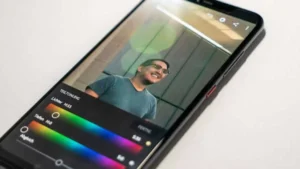
📱 The Power of Professional Mobile Apps
In 2025, the mobile editing landscape is richer than ever. Top apps like Lightroom Mobile, Snapseed, VSCO, Afterlight, and Darkroom offer a full suite of editing tools comparable to desktop applications. These apps allow RAW editing, AI-powered enhancements, selective color adjustments, advanced curves, and gradient masking — all from the palm of your hand.
Investing time in learning these apps is crucial. Mastering adjustment layers, color grading, and non-destructive workflows can make a significant difference in the final quality of your images.
💡 Tip: Use Lightroom Mobile’s cloud storage feature to synchronize edits across devices, making it easier to maintain a consistent portfolio.
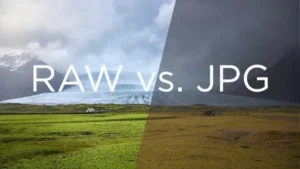
🤳 Shooting in RAW: A Non-Negotiable Step
If your smartphone supports it, always shoot in RAW format. Unlike JPEGs, RAW files retain much more information, including subtle highlights and deep shadows. This flexibility allows for extensive post-processing without degrading image quality.
Editing RAW images on mobile devices is smoother than ever in 2025. Lightroom Mobile and Snapseed now offer full RAW workflows optimized for speed and minimal battery drain.
🎁 Bonus: Shooting in RAW also unlocks the full potential of professional-grade presets, as they are designed to work with detailed, uncompressed files.
Intelligent Use of Presets
Presets remain an essential part of efficient editing, especially for mobile photographers who want to maintain a consistent style across social media platforms or client portfolios.
In 2025, mobile-optimized presets are smarter: many automatically adjust exposure and white balance based on scene recognition. High-quality preset packs for genres like travel, lifestyle, portraits, and urban photography have become indispensable tools for maintaining a visual signature.
💪 Pro Tip: Customize presets to your needs — adjusting tones, colors, and shadows — rather than relying on a “one-click” approach.
🤖 AI and Automation: A Powerful Ally
Artificial intelligence has drastically changed the way we edit photos. Modern mobile apps use AI for:
- Intelligent subject selection
- Automatic background replacement
- Smart color balancing
- Portrait retouching (skin smoothing, eye enhancement, etc.)
While AI tools speed up workflows, it’s important to use them thoughtfully. AI is a starting point — not a substitute for human creativity. Always tweak automated edits to ensure your image reflects your personal style.
Composition and Cropping Tools
Modern mobile editing isn’t just about color and light — it’s about perfecting the frame. Apps now include powerful cropping, straightening, and perspective-correction tools.
Correcting minor distortions, adjusting horizon lines, and aligning subjects to rule-of-thirds grids make a major difference in the final impression of your photo.
New for 2025: Some apps now offer dynamic cropping suggestions based on AI analysis of subject focus and balance — a fantastic time-saver for mobile photographers.
😎 Staying Ahead: Emerging Trends in 2025
- Vertical storytelling: Platforms like Instagram Reels, TikTok, and YouTube Shorts favor vertical images and videos. Optimize your editing workflow for vertical formats.
- Cinematic color grading: Teal-orange contrasts, muted highlights, and subtle grain effects are trending for a more cinematic feel.
- Authentic retouching: Users prefer natural, slightly imperfect edits over heavily airbrushed looks. Keep portrait editing realistic.
Get more information at our website : redpresets.com
Conclusion
As mobile cameras continue to push technological boundaries, mastering mobile editing is no longer optional — it’s an essential skill for modern photographers.
With the right combination of professional apps, thoughtful presets, AI enhancements, and creative vision, mobile photographers in 2025 can achieve results that rival professional DSLR setups.
The future of photography is in your pocket — and it has never been more exciting.



What Is Telemetryczny? A Complete Guide to Telemetric Systems
The Polish word telemetryczny means telemetric, i.e., the techniques and devices applied to measure, collect, transmit, and analyze data at...


Best AI Image Editor and Face Swap of 2026.
When you are looking at the most preferable edit pictures with AI applications and Magic Hour face swap websites in...


Why LeahRoseVIP Is the Go-To Digital Magazine for Modern Wellness
🌿 “Wellness is no longer a luxury—it’s a lifestyle. And LeahRoseVIP is leading the charge.” In a digital world flooded...


MyFastBroker.com: A Game-Changer for Modern Investors
itMyFastBroker.com is website designed to connect people and businesses with expert brokers in loans, business transactions, insurance, and mortgages. The...


XAI770K: Enhancing Data Security and Efficiency with AI-Blockchain Synergy
XAI770K presents an innovative platform which unites advanced artificial intelligence (AI) features with block chain technology capabilities to produce progressive...


Corsage: A Beautiful Tradition That Never Fades
Corsage is an elegant and thoughtful floral accessory that has defied generations and has not been set aside by passing...


HCOOCH CH₂ H₂O: Structure, Properties, and Industrial Applications
The complex compound HCOOCH CH₂ H₂O serves multiple industrial purposes in pharmaceutical applications along with organic synthesis and environmental science....


Princess Kazer: The Legendary Tale of Generosity, Bravery, and Leadership
Princess Kazer’s reputation endures generations because of the way her name sparkles in tradition. Due to her exceptional bravery combined...

Mannacote: Natural Coating for Safe Crop Protection
Food insecurity and plastic pollution are issues the entire world is struggling with, and the urgency of developing safe, sustainable,...


Nexus AlienSync: The AI Nervous System Powering Tomorrow’s Smart Systems
“AI won’t reach its full potential until it can truly communicate across systems. Nexus AlienSync is what makes that possible.”...
-
 BIOGRAPHY10 months ago
Behind the Scenes with Sandra Orlow: An Exclusive Interview
-
HOME1 year ago
Discovering Insights: A Deep Dive into the //vital-mag.net blog
-
HOME2 years ago
Sifangds in Action: Real-Life Applications and Success Stories
-
BIOGRAPHY1 year ago
The Woman Behind the Comedian: Meet Andrew Santino Wife